 Invite In
Seating chart maker: make a seating plan for your wedding or party
A seating chart maker, or seating plan maker, in your pocket. Add your tables, drag each guest or family onto one and see at once how many seats are used and who still has no table. Print the plan for the venue. The seating plan comes with a paid size.

Coming soon for iPhone and iPad
For Android. Up to 10 people per event included.
Tables as cards, guests as names
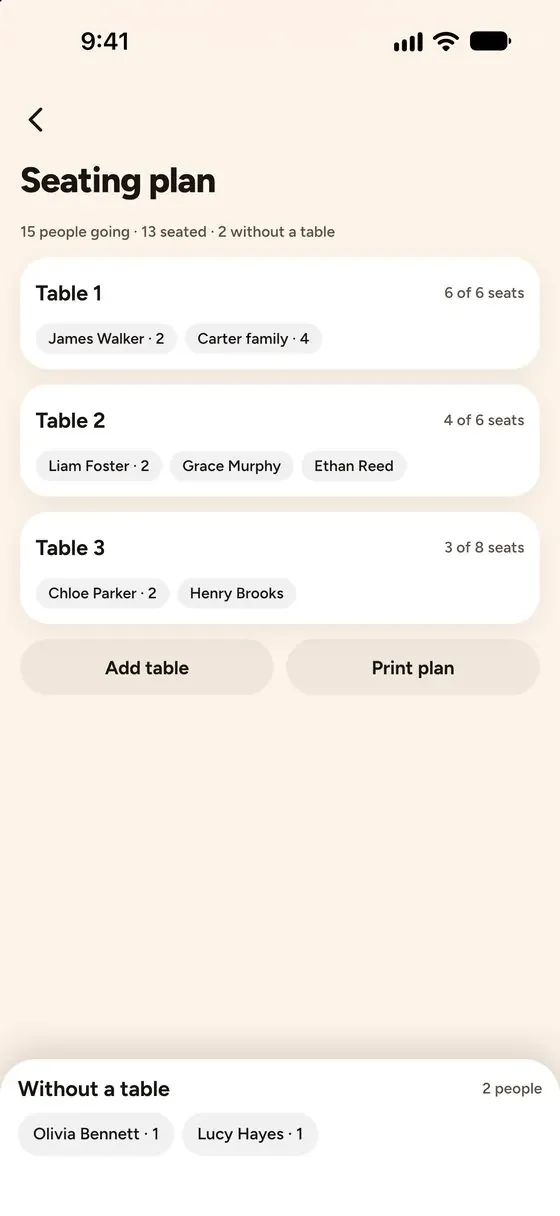
Every table shows its name, how many seats are used and who sits there. Guests who are going and have no table wait in a tray at the bottom, so you see who is left.
Drag a name to a table, or tap it
Hold a name and drag it to a table, or tap it and say how many sit where. A family of four can be split over two tables. Seated the wrong person? Undo is right there.
Your own tables and seats
Add as many tables as you need, give each a name and a number of seats, and change them later. Delete a table and its guests go back to "Without a table".
Print it and take it to the venue
Print the plan with the event name, date and place on top, every table with its guests and the people who still have no table at the end.
The door knows the table
When you scan a guest in at the door, door mode shows which table they sit at.
How the seating plan works
Collect the replies
Send the invitations and see who is going. Only guests who are going need a seat.
Add tables and seat guests
Drag names onto tables until nobody is left in the tray.
Print and scan
Print the plan, and at the door the app shows each guest's table.